FontMeter vs CSS Peeper: a free alternative
CSS Peeper keeps its typography tools and contrast checker in paid plans and asks for access to every site. FontMeter shows fonts, the type scale, colors and contrast for free, only when you click it.
CSS Peeper is a side panel for inspecting a website’s styles, colors and assets. Many of the parts that matter for typography sit in its paid plans. If what you need is the fonts, sizes, type scale, colors and contrast of a page, FontMeter does that for free, with no account, and only on the tab where you turn it on.
Disclosure: we make FontMeter. What we say about CSS Peeper comes from its Chrome Web Store listing, its pricing page and the permissions it asks for, checked on 5 November 2026.
The short version
- Stay with CSS Peeper if you want to download a site’s images and assets, or prefer a side panel.
- Use FontMeter for typography and color: every text style labeled, the fonts that really render, the type scale, contrast across the page, spacing, a color picker and the CSS of any element, all free.
Price and sign-up
CSS Peeper has a free plan that needs a sign-up, with a basic inspector, a limited number of “smart inspections” and asset and palette export. Its Professional and Ultra plans, billed yearly, add the advanced inspector, typography tools, the contrast checker, semantic color grouping and more. Its store listing names copying an element’s CSS and the typography hierarchy as premium features.
FontMeter has no plans and no account: every feature is free.
What each one can read
CSS Peeper asks to read and change data on all websites and runs its scripts on every page you open. FontMeter uses Chrome’s activeTab permission: it can read a page only after you click its icon (or press Alt+Shift+F) on that tab, and the access ends when you leave the page. It has no servers and sends nothing anywhere.
Feature by feature
| FontMeter | CSS Peeper | |
|---|---|---|
| Price | Free, no account | Free plan with sign-up; paid plans billed yearly |
| Typography on the page | Every style labeled on the page and listed with counts | Typography overview; hierarchy in paid plans |
| Fonts that render | Yes, with fallback, faux bold and failed-load warnings | — |
| Type scale | Tokens, closest ratio, export to CSS, Tailwind, JSON | — |
| Contrast | WCAG AA/AAA on every style; failing text outlined | Contrast checker in paid plans |
| Colors | By role (text, background, border) and as seen on screen; export as tokens | Palette export; semantic grouping in paid plans |
| Spacing | Inspector with margin, padding, border and radius, distances, ruler | Element inspector |
| Copy CSS | For any text style or element: font, color, box and background | For any element, in paid plans |
| Images and assets | — | Browse and download |
| Can read | The tab you turn it on for | All websites |
“—” means the tool doesn’t offer it, or CSS Peeper’s listing doesn’t mention it.
Typography, in detail
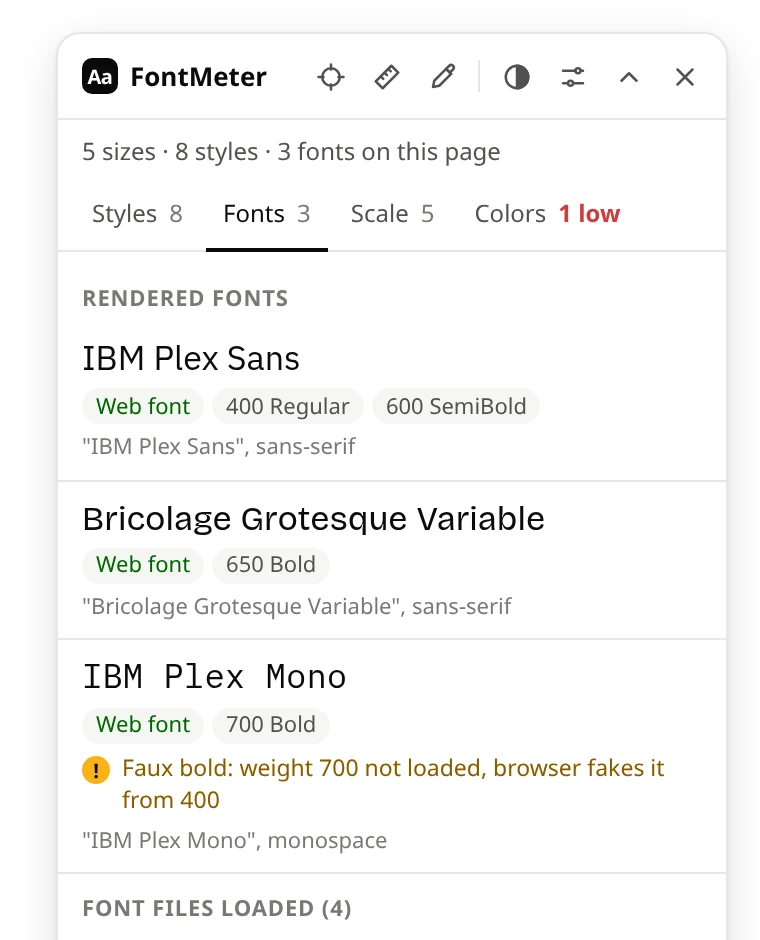
FontMeter’s Fonts tab lists the fonts that actually render, which can differ from the fonts in the CSS. It warns when the browser falls back from the requested font, fakes a bold or italic that wasn’t loaded, or a font file fails. The Scale tab turns the page’s sizes into tokens and finds the closest modular ratio.
Colors and contrast
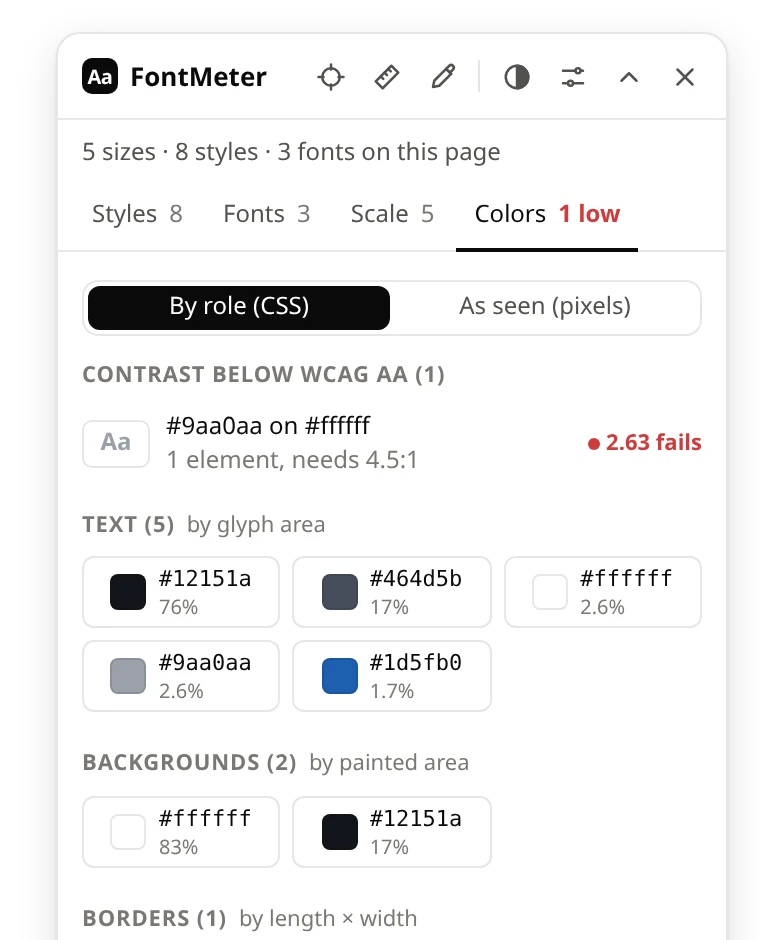
The Colors tab lists text below WCAG AA first (click one to outline it on the page), then text, background and border colors, weighted by how much of the page they paint. “As seen” groups the pixels on screen, so colors from images and gradients show up too. The color picker reads any pixel and gives HEX, RGB, HSL and OKLCH.
Where CSS Peeper is the better pick
If you collect a site’s images, icons and graphics, CSS Peeper does that and FontMeter doesn’t. It also works from a side panel, which some people prefer to an overlay. FontMeter’s inspector shows and copies the CSS that defines how an element looks (font, color, padding, margin, border, radius, background), see how to view the CSS of any element.
Comparing more tools? See the best font finder extensions.
See every font on a page in one click.
FontMeter is free. Add it to Chrome, open any page and press Alt+Shift+F. On Microsoft Edge? Get it from Edge Add-ons.
More guides
- Guide
How to find out what font a website is using
DevTools, a font finder extension, the Network panel and image tools, and why the CSS font isn’t always the one you see.
- Guide
How to view the CSS of any element on a website
A CSS viewer extension, DevTools and the stylesheet itself: how to see and copy the CSS of anything on a page.
- Guide
The best font finder extensions for Chrome
WhatFont, Fonts Ninja, Font Finder, CSS Peeper, VisBug and FontMeter: what each shows, costs and can read.
- Comparison
FontMeter vs WhatFont
A quick font check under the cursor, or every text style on the page at once.
- Comparison
FontMeter vs VisBug
Edit the live page like an artboard, or read its typography and measure it.
- Guide
rem vs em: what’s the difference, and which to use
How rem and em work, why em compounds when nested, a px to rem table, and when to use rem, em or px.
- Guide
pt to px: convert points to pixels
A converter and a table of common sizes: 1pt = 1.333px, 1px = 0.75pt, 12pt = 16px.