What font does YouTube use?
YouTube’s website renders Roboto, Google’s free typeface, for video titles, channel names and view counts. Sizes and weights measured with FontMeter on a video page.
The short answer
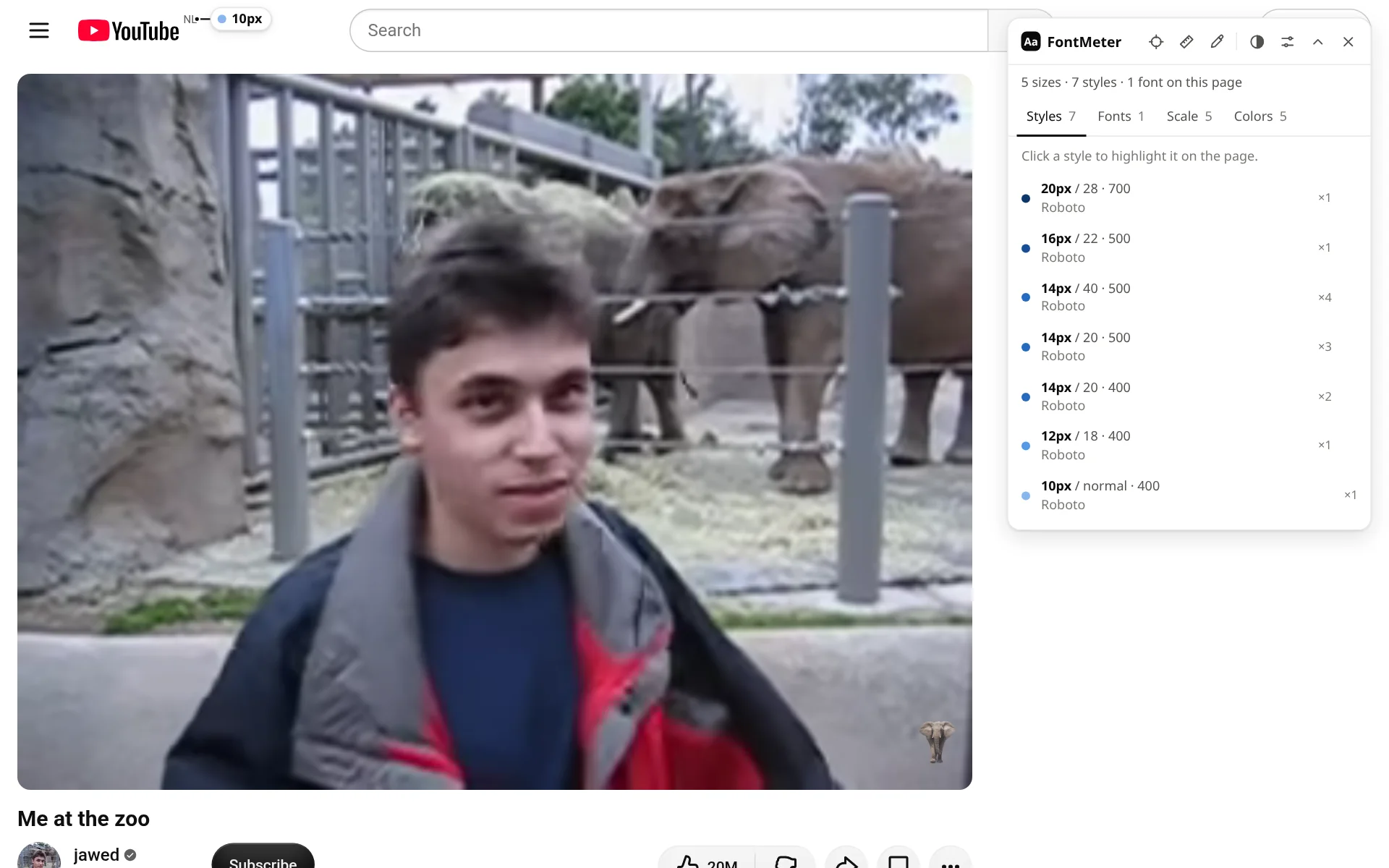
YouTube’s website renders Roboto for all of its text: the video title (20px Bold on a video page), channel names, view counts and the country code next to the logo. Roboto is the typeface Google made for Android, and it is free on Google Fonts.
Fonts on youtube.com
| Font | Source | Weights in the CSS | Share of the text |
|---|---|---|---|
| Roboto | Web font (downloaded) | 400 Regular, 500 Medium, 700 Bold | 100% |
Roboto. Used in Regular (400), Medium (500) and Bold (700). The CSS falls back to Arial, then any sans-serif. One stack starts with “YouTube Noto”, a font that wasn’t available on this page, so Roboto took over there too.
Text styles
| Text | Size / line height | Weight | Font |
|---|---|---|---|
| Video title (“Me at the zoo”) | 20px / 28px | 700 Bold | Roboto |
| Channel name | 16px / 22px | 500 Medium | Roboto |
| View count and upload date | 14px / 20px | 500 Medium | Roboto |
| Subscriber count | 12px / 18px | 400 Regular | Roboto |
| Country code next to the logo | 10px / normal | 400 Regular | Roboto |
Type scale
Small sizes, close together: everything is between 10 and 20px, and the video title is the largest text on the page.
The YouTube logo
The logo is an SVG drawing, not text, so no font draws it on the page.
How to get Roboto
Roboto is free on Google Fonts, for websites, apps and print, and many Android phones use it as their system font. Google Fonts also has Roboto Flex, a variable version with more widths and weights.
Check it yourself
- Add FontMeter to Chrome (it’s free).
- Open youtube.com/watch?v=jNQXAC9IVRw and press Alt+Shift+F.
- Open the Fonts tab for the fonts that render, or hover any label for that text’s font and size.
Other ways to find a website’s font, with nothing to install: how to find out what font a website is using.
How this was measured
FontMeter 2.0.0 in Chromium 156 on Linux, signed out, from the Netherlands, on 5 November 2026. Page: https://www.youtube.com/watch?v=jNQXAC9IVRw. Sites change their fonts, test new designs and show different pages by country and account, so what you see may differ. Fonts that come from your computer (rather than the website) depend on your operating system.
See every font on a page in one click.
FontMeter is free. Add it to Chrome, open any page and press Alt+Shift+F. On Microsoft Edge? Get it from Edge Add-ons.
Fonts on other websites
- netflix.com
What font does Netflix use?
Netflix Sans
- whatsapp.com
What font does WhatsApp use?
WhatsApp Sans
- amazon.com
What font does Amazon use?
Arial and Amazon Ember
- duolingo.com
What font does Duolingo use?
Duolingo Sans and Feather
- airbnb.com
What font does Airbnb use?
Airbnb Cereal
- notion.com
What font does Notion use?
NotionInter, Lyon Text
- ikea.com
What font does IKEA use?
Noto IKEA
- wikipedia.org
What font does Wikipedia use?
Default sans-serif, Linux Libertine / Georgia
- vogue.com
What font does Vogue use?
Vogue Avant Garde