What font does Wikipedia use?
Wikipedia loads no web fonts: text is your device’s default sans-serif and headings use Linux Libertine, Georgia or Times. Sizes and styles measured with FontMeter.
The short answer
Wikipedia doesn’t load any web fonts. Its text uses the generic sans-serif family, so every reader sees their own device’s default sans-serif (in Chrome, Arial on Windows and Helvetica on a Mac). Article titles and section headings use a serif stack that starts with Linux Libertine, then Georgia and Times. Article text is 16px with a 26px line height.
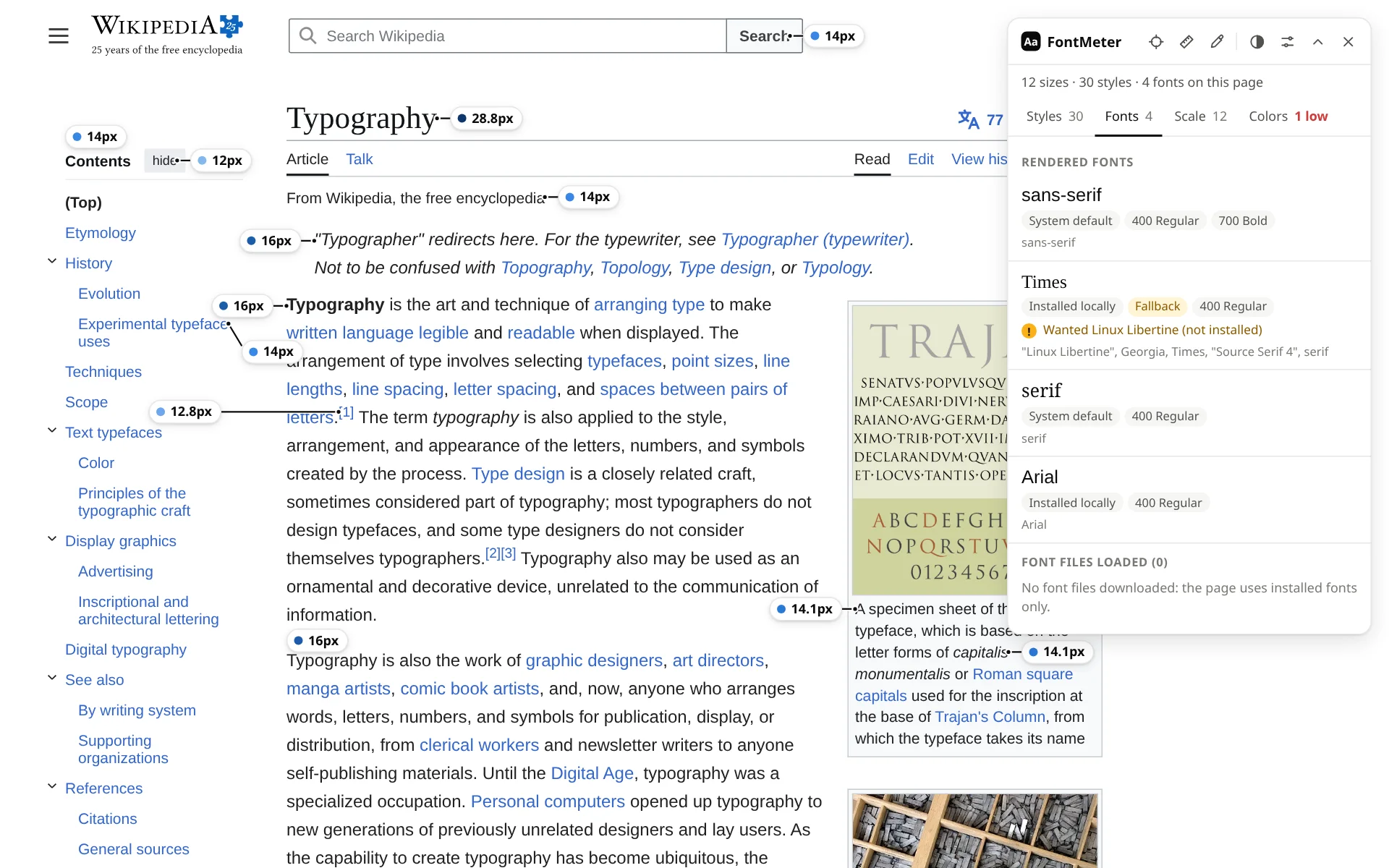
Fonts on wikipedia.org
| Font | Source | Weights in the CSS | Share of the text |
|---|---|---|---|
Default sans-serif sans-serif | Browser default | 400 Regular, 700 Bold | 99.7% |
Linux Libertine, Georgia or Times Times | Installed on the computer | 400 Regular | 0.3% |
Default sans-serif. Article text, navigation and references. The CSS names no font, only the generic family, so the result depends on the reader’s device and browser settings.
Linux Libertine, Georgia or Times. Article titles and section headings ask for Linux Libertine, then Georgia, Times and Source Serif 4. The test machine had neither of the first two, so they rendered in Times. Georgia comes with Windows and macOS, so most readers there see Georgia.
Text styles
| Text | Size / line height | Weight | Font |
|---|---|---|---|
| Section headings (“Etymology”) | 24px / 33px | 400 Regular | Linux Libertine, Georgia or Times |
| Subsection headings (“Evolution”) | 19.2px / 30.72px | 700 Bold | Default sans-serif |
| Article text | 16px / 26px | 400 Regular | Default sans-serif |
| References and lists | 14.4px / 23.4px | 400 Regular | Default sans-serif |
| Image captions | 14.14px / 19.8px | 400 Regular | Default sans-serif |
| Sidebar links (“Donate”) | 14px / normal | 400 Regular | Default sans-serif |
| Footnote markers (“[1]”) | 12.8px / 12.8px | 400 Regular | Default sans-serif |
Type scale
Twelve sizes, from 12 to 28.8px. Many are fractions of the 16px article text (14.4, 12.8, 19.2, 28.8), the sign of sizes set relative to the surrounding text.
How to get the same look
Body text needs no download: it is your device’s default sans-serif. For the headings, Source Serif 4, the last named font in Wikipedia’s stack, is free on Google Fonts: Source Serif 4. Linux Libertine itself is a free, open-source font.
Check it yourself
- Add FontMeter to Chrome (it’s free).
- Open en.wikipedia.org/wiki/Typography and press Alt+Shift+F.
- Open the Fonts tab for the fonts that render, or hover any label for that text’s font and size.
Other ways to find a website’s font, with nothing to install: how to find out what font a website is using.
How this was measured
FontMeter 2.0.2 in Chromium 156 on Linux, signed out, from the Netherlands, on 18 November 2026. Page: https://en.wikipedia.org/wiki/Typography. Sites change their fonts, test new designs and show different pages by country and account, so what you see may differ. Fonts that come from your computer (rather than the website) depend on your operating system.
See every font on a page in one click.
FontMeter is free. Add it to Chrome, open any page and press Alt+Shift+F. On Microsoft Edge? Get it from Edge Add-ons.
Fonts on other websites
- netflix.com
What font does Netflix use?
Netflix Sans
- whatsapp.com
What font does WhatsApp use?
WhatsApp Sans
- youtube.com
What font does YouTube use?
Roboto
- amazon.com
What font does Amazon use?
Arial and Amazon Ember
- duolingo.com
What font does Duolingo use?
Duolingo Sans and Feather
- airbnb.com
What font does Airbnb use?
Airbnb Cereal
- notion.com
What font does Notion use?
NotionInter, Lyon Text
- ikea.com
What font does IKEA use?
Noto IKEA
- vogue.com
What font does Vogue use?
Vogue Avant Garde