What font does Notion use?
Notion’s website uses NotionInter for nearly all text and the serif Lyon Text for customer quotes. Sizes, weights and font files measured with FontMeter, plus free alternatives.
The short answer
Notion’s website uses two typefaces, both loaded as web fonts. NotionInter sets nearly everything: the headlines, navigation and body text, 76% of the characters on the home page. Lyon Text, a serif, sets the customer quotes. The main headline is 96px NotionInter in SemiBold (600); most interface text is 14px.
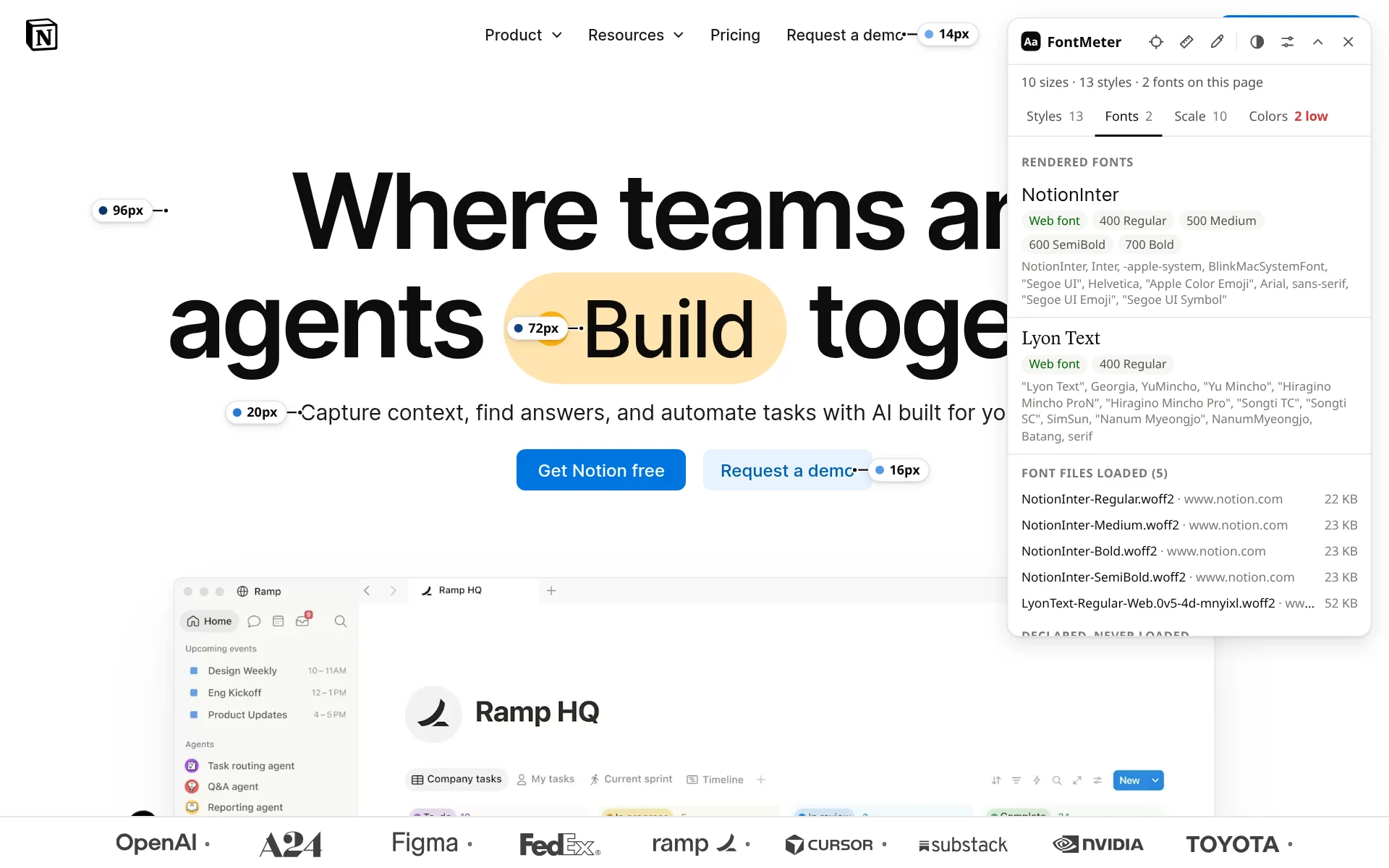
Fonts on notion.com
| Font | Source | Weights in the CSS | Share of the text |
|---|---|---|---|
| NotionInter | Web font (downloaded) | 400 Regular, 500 Medium, 600 Semibold, 700 Bold | 76.3% |
| Lyon Text | Web font (downloaded) | 400 Regular | 23.7% |
NotionInter. Loaded from notion.com as four files, Regular, Medium, SemiBold and Bold, 22-23 KB each. Next in the stack is Inter, then Apple’s system font, Segoe UI, Helvetica and Arial.
Lyon Text. A serif, loaded as one 52 KB file in Regular only and used for the quotes. It falls back to Georgia, then to Japanese, Chinese and Korean serif fonts.
Text styles
| Text | Size / line height | Weight | Font |
|---|---|---|---|
| Main headline (“Where teams and agents…”) | 96px / 100px | 600 Semibold | NotionInter |
| Section headings (“AI where your team works.”) | 54px / 56px | 700 Bold | NotionInter |
| Card headings (“Bring everything into one system of record.”) | 22px / 28px | 700 Bold | NotionInter |
| The line under the headline | 20px / 28px | 400 Regular | NotionInter |
| Customer quotes | 18px / 28px | 400 Regular | Lyon Text |
| Feature titles (“Triage product feedback”) | 16px / 24px | 700 Bold | NotionInter |
| Navigation and labels (“Product”) | 14px / 20px | 500 Medium | NotionInter |
| Body text (“The most ambitious companies run on Notion.”) | 14px / 20px | 400 Regular | NotionInter |
Type scale
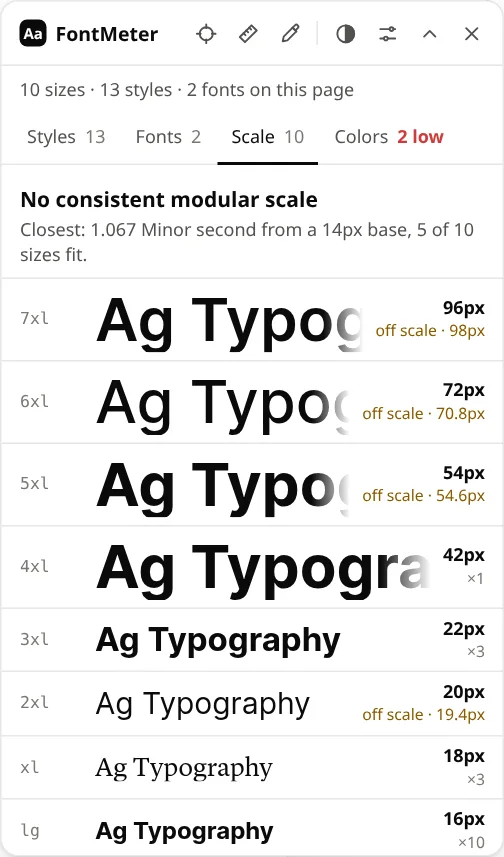
Ten sizes, from 12 to 96px. Most text is 14px, and the headlines jump to 54, 72 and 96px, so the sizes don’t follow one modular ratio.
Free fonts like Notion’s
Inter, the next font in Notion’s stack, is free on Google Fonts and gives the closest match: Inter. For the quotes, free serifs with a similar book-like feel include Source Serif 4 and Literata.
Check it yourself
- Add FontMeter to Chrome (it’s free).
- Open notion.com and press Alt+Shift+F.
- Open the Fonts tab for the fonts that render, or hover any label for that text’s font and size.
Other ways to find a website’s font, with nothing to install: how to find out what font a website is using.
How this was measured
FontMeter 2.0.2 in Chromium 156 on Linux, signed out, from the Netherlands, on 18 November 2026. Page: https://www.notion.com/. Sites change their fonts, test new designs and show different pages by country and account, so what you see may differ. Fonts that come from your computer (rather than the website) depend on your operating system.
See every font on a page in one click.
FontMeter is free. Add it to Chrome, open any page and press Alt+Shift+F. On Microsoft Edge? Get it from Edge Add-ons.
Fonts on other websites
- netflix.com
What font does Netflix use?
Netflix Sans
- whatsapp.com
What font does WhatsApp use?
WhatsApp Sans
- youtube.com
What font does YouTube use?
Roboto
- amazon.com
What font does Amazon use?
Arial and Amazon Ember
- duolingo.com
What font does Duolingo use?
Duolingo Sans and Feather
- airbnb.com
What font does Airbnb use?
Airbnb Cereal
- ikea.com
What font does IKEA use?
Noto IKEA
- wikipedia.org
What font does Wikipedia use?
Default sans-serif, Linux Libertine / Georgia
- vogue.com
What font does Vogue use?
Vogue Avant Garde